|
All-In-1-Cyber Sec |
|
Pager under construction |






|
Under the covers While you work, we defend! |



|
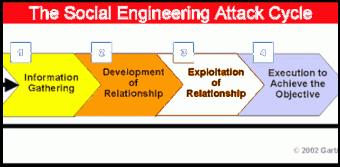
What is the latest Social engineering tactic? The scammer calls any user claiming it is from a legitimate source, for example IT or Microsoft, offering the victim his or her assistance with a computer problem or fabricated scam issue. The caller then guides the victim through a remote session taking control of the networked computer and penetrating the network as a legitimate user. A few defenses against Social Engineering Attacks other than common sense. Any calls for technical support requesting remote desktop connection should always be from an extension within the District. When the issue was originated by you on technical support, make sure you know who is calling and request the Case Number. External support calls requesting information or remote desktop connection are usually for IT equipment or software managed by the Information Technology Bureau or the technician in charge of the application..
Don’t Click That Link |
|
Security Awareness Concepts –
Phishing: The art of obtaining confidential information using email tactics to lure users to click on links or download files that will infect the computer with information collectors and key recorders. It has become easier for the hackers to gain access to secure networks, using Social Engineering (Phishing) rather than brute force hacking. In 2012, phishing attacks have gone up 64.9% from January with 21030 to July with 59,406 per month. Ref. (RSA Online Fraud Reports, 2012) Some examples of phishing are: “Your account has expired, click on this link to solve your problem “ The account could be a bank account, a credit card account, a social network account or any other account where you are required to enter your user name and password. “Open this attachment for more information” The attachment may contain a link to a malicious program that will collect information from your computer or network. Messages with subjects like: “Package Routing Information”, “Pictures”, “It’s me”, “Your car”, “Insurance Information”, “Family”, “Old Friend”, “Stranded friend”, “ Check this pic”, “You are a winner!”, etc. Phony security alerts .These alerts are pop-ups telling you the computer is at risk or is infected, usually they contain a link to help you clean your computer or make it faster. This is a phony link. Summary: Suspect emails that are unsolicited, from an unexpected source, containing an attachment or link, ask for personal information, have spelling errors or they are not address to you by name. You can block these emails using Postini (for help call the service desk) and delete them from your inbox. Do not click on links, or forward emails that look suspicious. DO NOT SEND PRIVATE INFORMATION ON EMAIL OR MESSENGER Social Security Number, Date of Birth Account Numbers, Pin Numbers Family information Every email sent using the District email becomes public record Ref. (Computer Security University of California Beware of Scams, 2012) |